Bézier Simplex and Simploid Visualization
Visualizing high-dimensional Bézier simplices and simploids is crucial for understanding the manifold structure and analyzing Pareto fronts. PyTorch-BSF provides high-level utilities to project and plot 2D and 3D Bézier manifolds.
The torch_bsf.plotting Module
The plot_bezier_simplex() function provides a high-level API for visualization of a Bézier simplex, such as a model returned by torch_bsf.fit(). It automatically handles the dimensionality of your model. For a Bézier simploid with more than one factor, use plot_bezier_simploid() (see Bézier Simploids and Simploidal Bézier Spaces).
import torch
import torch_bsf
from torch_bsf.plotting import plot_bezier_simplex
from torch_bsf.sampling import simplex_grid
import matplotlib.pyplot as plt

# Fit a model (e.g., a Bézier triangle in 3D)
ts = simplex_grid(n_params=3, degree=6)
xs = torch.stack([ts[:, 0], ts[:, 1], ts[:, 0] * ts[:, 1] * ts[:, 2]], dim=1)
bs = torch_bsf.fit(params=ts, values=xs, degree=3)

# Plot the model
fig = plt.figure(figsize=(10, 8))
ax = plot_bezier_simplex(bs, num=100)
plt.title("Bézier Manifold in 3D Space")
plt.show()
Supported Plot Types
Bézier Curves (\(n\_params=2\))
For Bézier curves, the tool plots a smooth path.
2D Values: Plots a path in the XY plane.
3D Values: Plots a 3D path in XYZ space.
Optional: Control points and the “control polygon” can be displayed using
show_control_points=True.
Bézier Triangles (\(n\_params=3\))
For Bézier triangles (surfaces), the tool uses triangulation to render a smooth manifold.
2D Values: Plots a projection of the surface into 2D space.
3D Values: Renders a smooth 3D surface using
plot_trisurf.Optional: Control points and the underlying mesh can be displayed.
High-Dimensional Bézier Simplices (\(n\_params \geq 4\))
For high-dimensional Bézier simplices, the function creates a pairwise scatter plot (pair plot) of the output values.
Diagonal panels: Histograms showing the distribution of each output dimension individually.
Off-diagonal panels: Scatter plots showing the relationship between every pair of output dimensions.
Optional: Control points are overlaid on off-diagonal panels and as vertical lines on diagonal panels when
show_control_points=True.
The return value is a 2-D numpy.ndarray of matplotlib.axes.Axes with
shape (n_values, n_values).
from torch_bsf import BezierSimploid
from torch_bsf.plotting import plot_bezier_simplex
import matplotlib.pyplot as plt

# Build a random degree-2 model on a 3-simplex (n_params=4) with 3 outputs
model = BezierSimploid.randn((3,), 2, 3)

# Plot returns an (n_values, n_values) grid of axes
axes = plot_bezier_simplex(model, num=30)
axes[0, 1].set_xlabel("Objective 2")
axes[1, 0].set_ylabel("Objective 1")
plt.suptitle("Pairwise Plot of High-Dimensional Bézier Simplex")
plt.tight_layout()
plt.show()
Customizing the Plot
The plot_bezier_simplex() function returns a standard Matplotlib axes object (Axes or Axes3D) for low-dimensional models, and a 2-D array of Axes for high-dimensional models. You can customize labels, titles, and styles using the standard Matplotlib API.
ax = plot_bezier_simplex(bs, num=100, color="blue")
ax.set_xlabel("Objective 1")
ax.set_ylabel("Objective 2")
ax.set_zlabel("Objective 3")
ax.view_init(elev=20, azim=45)
Bézier Simploids and Simploidal Bézier Spaces
Models of the Simploidal Sets module have their own plotting functions:
plot_bezier_simploid(model, num=20, ax=None, show_control_points=True, **kwargs)draws aBezierSimploid.plot_simploidal_bezier_space(space, num=20, ax=None, show_control_points=True, **kwargs)draws every main simploid of aSimploidalBezierSpaceon one axes, each piece in its own color of the Matplotlib color cycle (passcolor=...to use one color for all pieces).
Both support models with n_values of 2 (a 2D axes) or 3 (a 3D axes) and
raise ValueError otherwise. num is the number of grid intervals along
each edge of the parameter domain. How a piece is drawn depends on the
dimension of its simploid type:
Simploid |
Drawn as |
|---|---|
vertex |
a point |
edge |
a curve ( |
triangle |
a triangulated surface ( |
dimension 3 or more, e.g. |
the surfaces of all its 2-dimensional faces (the boundary of the solid) |
With show_control_points=True (the default) the control net is drawn as
red points joined by dashed segments: two control points are joined when their
indices differ by \(e_k - e_l\) in a single factor, which gives the
triangular net of a simplex factor and the grid of a cube.
import torch
from torch_bsf.plotting import plot_simploidal_bezier_space
from torch_bsf.simploidal import SimploidalSet, SimploidalBezierSpace

S = SimploidalSet()
tri, sq = S.add_simplex(2), S.add_simploid((1, 1))
S.identify(tri.face(0, 2), sq.face(1, 1))  # glue the two along an edge

space = SimploidalBezierSpace(S, degree=2, n_values=3)
torch.nn.init.normal_(space.proper_control_points)

ax = plot_simploidal_bezier_space(space, num=20)
ax.set_title("A triangle and a square sharing an edge")
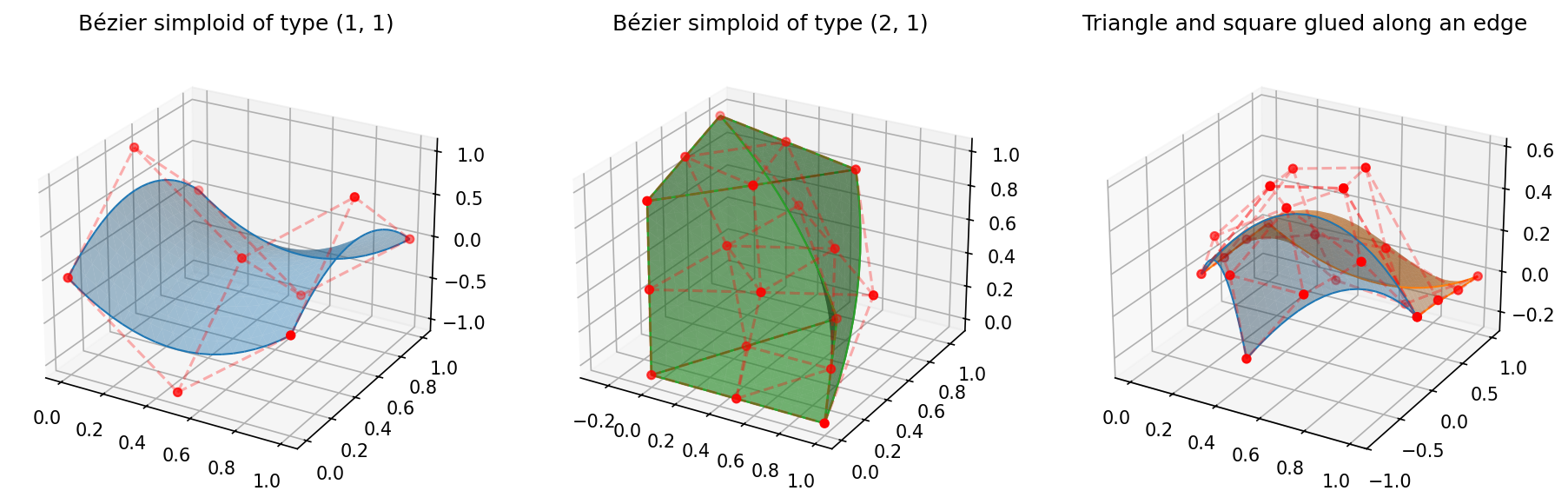
Fig. 6 Bézier simploids of types \((1, 1)\) and \((2, 1)\), and a simploidal
Bézier space made of a triangle and a square sharing an edge.
Generated by examples/generate_simploidal_plot.py.
Why Visualize?
Validation: See how well the Bézier simplex or simploid fits your training observations.
Pareto Front Analysis: Analyze the shape and tradeoff of your Pareto front in multi-objective optimization.
Communication: Clearly communicate the structure of high-dimensional manifolds to stakeholders.